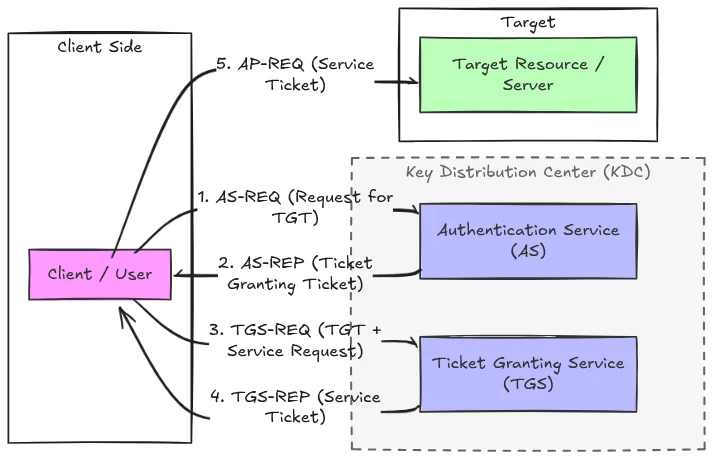
Kerberos authentication flow: the KDC issues service tickets encrypted with the service account's hash
How It Works
1
Client requests a service ticket (TGS-REQ)
The authenticated user sends a request to the KDC asking for a ticket for service X, including their TGT as proof of identity. The KDC does not verify whether you actually need to access that service.
2
KDC issues an encrypted TGS
The KDC returns a TGS ticket encrypted with the service account’s NTLM hash (RC4-HMAC or AES256 depending on the account config).
3
Take the ticket offline and crack it
You now hold a blob encrypted with the service account’s password. No further domain interaction needed, crack it offline.
Why It Works
- SPNs identify service accounts (e.g.
MSSQLSvc/db.domain.local:1433) - The TGS is encrypted with RC4-HMAC (etype 23) or AES256 (etype 18) using the service account’s password hash
- No special privileges required: any domain user can request tickets
- RC4 hashes crack significantly faster than AES256
Finding Kerberoastable Accounts
Look for user accounts (not computer accounts) with SPNs: service accounts are the target, especially ones with weak passwords.- Linux — Password
- Linux — NT Hash
- Linux — Kerberos
- Windows
Requesting Hashes
- Linux — Password
- Linux — NT Hash
- Linux — Kerberos
- Windows (Rubeus)
Cracking
RC4 hashes (etype 23,$krb5tgs$23$*) crack much faster than AES256. Try to force RC4 with /tgtdeleg if the service account supports it.
Targeted Kerberoasting
If you haveGenericWrite on a user account, you can set an SPN on it, request the TGS, then clean up. Useful for accounts that don’t normally have SPNs.
- Linux
- Windows
1
Set a fake SPN on the target account
2
Request the TGS
3
Clean up
Clock Skew (faketime)
Kerberos requires your clock to be within 5 minutes of the DC. If you getKRB_AP_ERR_SKEW, use faketime to offset your system time for the duration of the command.